Quick Take
- The finding: Among participants who completed three standardized design tasks, access to the prompt-to-design tool Figma Make cut completion time by about 20% on average per task and by 27% cumulatively.
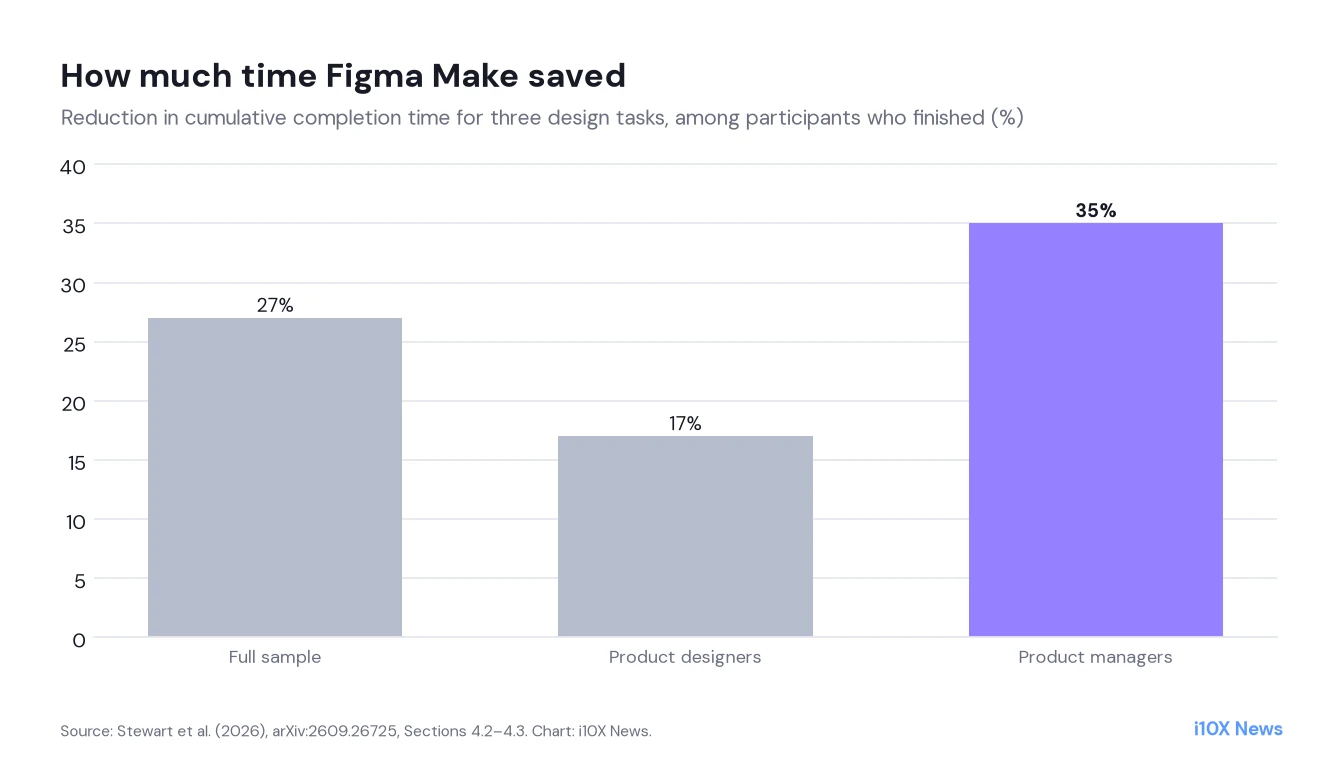
- Who gains most: Product managers saved 22 minutes 46 seconds over the full experiment, a 35% reduction, and were 38 percentage points more likely to finish the hardest task. Professional designers saved time only on that task, for a marginally significant 17% overall.
- What it means: Prompt-to-design tools mainly lower the barrier for non-designers. For designers, the benefit appears to depend on the task.
Experiments on AI productivity have so far focused on software engineering, with mixed results ranging from large time savings to slowdowns. Product design has had little experimental evidence, even though 91% of designers in one 2026 survey reported using AI at least weekly. Four researchers at Figma ran a randomized controlled trial of the company’s own prompt-to-design tool, Figma Make, which generates prototypes and supporting code through conversation.
What the study shows
Fifty product designers and fifty product managers attempted three standardized tasks in a fixed order, with or without Figma Make: adding a dark mode, building a settings screen and creating a comment modal. Completion rates exceeded 90% for the first two tasks but fell to 73% for the third. Time savings are measured only for participants who completed a task.
| Time saved with Figma Make | Full sample | Designers | Product managers |
|---|---|---|---|
| Task 1 (Dark mode) | 0:56 (n.s.) | −1:21 (n.s.) | 3:13 (n.s.) |
| Task 2 (Settings) | 2:52** | 1:10 (n.s.) | 4:34** |
| Task 3 (Comment modal) | 11:21*** | 7:41** | 15:00*** |
| Tasks 1–3 cumulative | 15:08*** | 7:30* | 22:46*** |
- Biggest effect on the hardest task: Task 3 time fell by 32% for the full sample (11 minutes 21 seconds), and the probability of completing it was 19.9 points higher with Figma Make.
- Product managers benefit most: PMs saved 35% of their cumulative time and raised their Task 3 completion rate by 38 points, lifting their average completion rate by 20 points.
- Designers gain only on complex work: Designers saved 7 minutes 41 seconds (26%) on Task 3 and showed no significant savings on the simpler tasks.
- Easier and more usable: The authors report a 16% gain in rated task ease and a 15% improvement in perceived usability with the tool.
- Non-users of AI struggle: The 2% of participants who never use AI at work had a completion rate 30.3 points lower and took 35 minutes longer cumulatively than those using AI a few times a week.
Why it matters: who gets to design
The results suggest prompt-to-design tools redistribute design work more than they speed up designers. Product managers, who mostly had not used Figma AI before, completed more and faster. That supports the idea that these tools let non-designers contribute directly to prototypes.
For professional designers, the gains were limited to the most complex task, which fits mixed evidence from software engineering, where experienced developers sometimes see small or negative effects.
Method in brief
The trial was run with the research firm MeasuringU. Participants were randomized to treatment (Figma Make available) or control, and models used generalized estimating equations with cluster-robust standard errors and 95% confidence intervals. Outcomes were completion, time to completion, task ease ratings and System Usability Scale scores.
What remains open
- Survivor bias in time: Time is measured only for completed tasks, and the tool also changed who completed tasks, especially PMs on Task 3. The authors say time savings should be read alongside completion rates.
- Standardized tasks: Fixed tasks with a target design do not capture ambiguity, stakeholder feedback or changing requirements of real projects.
- Quality not graded in depth: The headline metrics are time and completion, not the quality or maintainability of the designs.
- Vendor study: All four authors work at Figma, which makes the tool being evaluated.
Context
The paper sits alongside a growing set of AI productivity RCTs in coding and customer support, which typically find larger gains for less experienced users. Here the less experienced group is a different profession altogether. More workplace AI research is in our Society & Economy section.
What it means for product teams
- Let PMs prototype: Prompt-to-design tools can let product managers produce working prototypes, freeing designers for complex work.
- Measure by task type: Gains for designers appeared only on the most complex task. Pilot on your own workflows before assuming savings.
- Train the AI-hesitant: Participants who never used AI fared much worse. Basic AI familiarity is a prerequisite for benefits.
About the analysis
Researched and written with AI assistance under the editorial responsibility of the i10X News team. The title image is an AI-generated illustration. Read our AI Use Policy. Spotted an error? Request a correction.
This article is based on the full text of the preprint “Does AI Save Time on Product Design? A Randomized Controlled Experiment of AI Prompt-to-Design Workflows” (arXiv:2609.26725v1, submitted September 22, 2026). All numbers are taken from the paper’s text, tables and figures; i10X did not rerun the experiments. The chart was redrawn by i10X from Sections 4.2–4.3 of the paper, which is published under a CC BY-SA 4.0 license.
i10x Perspective
This is a vendor study, and it should be read as one. Still, the design is a real RCT, and the most interesting result is not the average time saving but who benefits: product managers, not designers. That points to the bigger shift prompt-to-design tools bring, a blurring of roles in product teams. The question for design leaders is less whether their designers become faster and more how to work with colleagues who can now ship a plausible prototype themselves.